
Home Security
Residential ADT Home Security Setup for Homeowners

A resilient residential ADT home security setup should account for two separate interruptions: a power outage and a Wi-Fi outage. Backup power can keep compatible equipment running, while an alternate communication connection may help maintain contact if home internet goes down. Planning for both makes the system less dependent on a single utility or connection.
It’s easy to focus first on sensors and cameras. But even well-placed devices can be limited if they lose power or cannot communicate. A practical setup considers what stays on, how devices connect, and what happens when either backup is needed.
This guide explains how power and Wi-Fi backup fit into a home security setup, what to consider when choosing and installing equipment, and which factors affect cost. You’ll also learn how residential solar and battery storage can support household energy planning, and when those upgrades may make sense alongside security planning.
Key Takeaways
- Plan for power loss and internet disruption as separate risks; backup for one doesn’t automatically cover the other.
- Map which security devices need power and connectivity so you can prioritize what must remain available during an outage.
- Review how sensors and cameras fit your household’s needs, including where devices are placed and what they detect.
- Consider home battery storage and solar as part of a broader plan for household power resilience.
- Compare setup options by their backup approach, device compatibility, and the needs of your home.
Table of Contents
Power and Wi-Fi backup
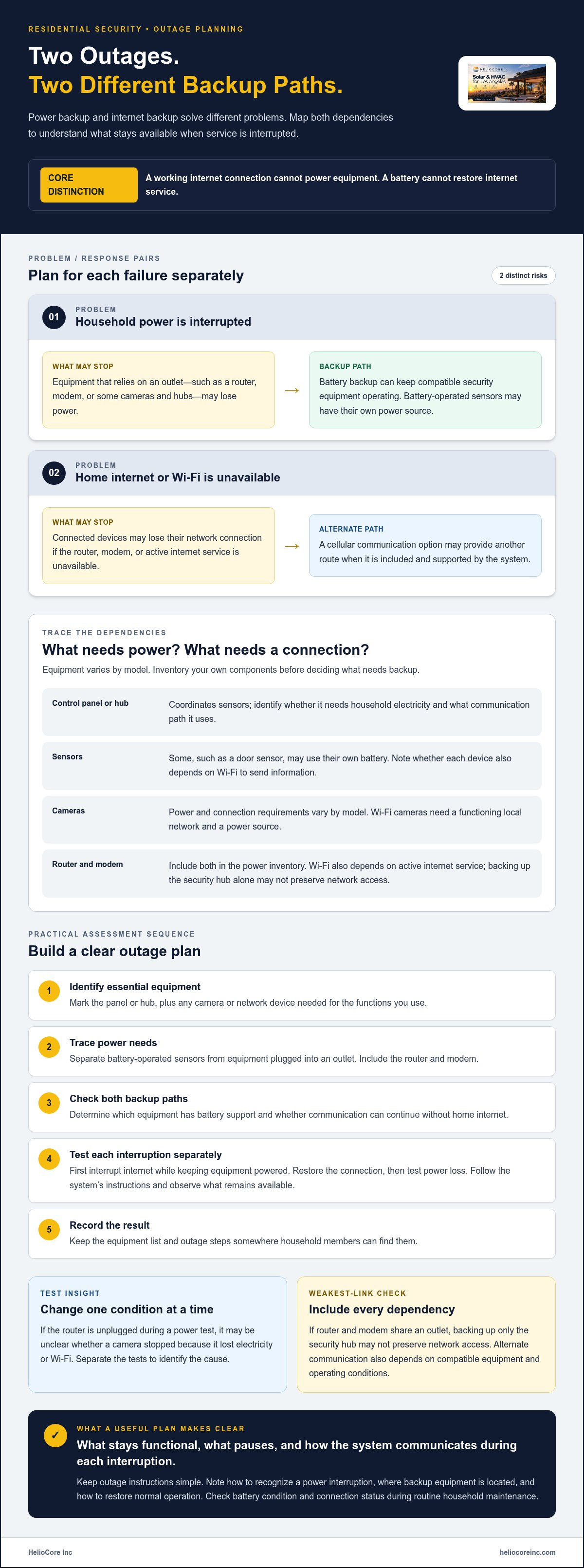
A residential ADT home security setup should account for two separate failures: loss of household power and loss of internet. A battery backup may keep compatible security equipment operating during an outage, while a separate communication path may help equipment stay connected. One backup does not automatically solve both problems. A powered router still needs an internet connection, and a working internet connection cannot power a system with a dead battery.
Start by tracing the system’s components. List the control panel, sensors, cameras, router, and modem, then note which devices need household electricity and which use batteries. For example, a door sensor may use its own battery, while a router needs power from an outlet. Cameras and hubs vary by model. This inventory shows which devices need backup power and which depend on Wi-Fi to send information.
Next, distinguish power backup from internet backup. A battery connected to compatible equipment can provide power when an outlet loses electricity. It does not restore service from an internet provider. Wi-Fi depends on the router, modem, and active internet service. If any part of that path is unavailable, connected devices may lose their network connection. A cellular communication option can provide a different route when included and supported by the system.
Use this practical sequence to assess the setup:
- Identify essential equipment. Mark the panel or hub that coordinates sensors, plus any camera or network device needed for the functions you use.
- Trace power needs. Separate battery-operated sensors from equipment that plugs into an outlet. Include the router and modem in the list.
- Check the backup path. Determine which equipment has battery support and whether communication can continue without home internet.
- Test the handoff. Follow the system’s instructions to simulate a power interruption and an internet interruption separately. Confirm what remains available in each test.
- Record the result. Keep the equipment list and outage steps somewhere household members can find them.
Test each interruption separately. If you unplug the router during a power test, you may not know whether a camera stopped because it lost electricity or Wi-Fi. Instead, first disconnect the internet while keeping equipment powered, then restore the connection and test power loss. Observe which sensors continue working locally, which cameras lose access, and what the control panel reports. Results depend on the equipment and its communication design.
Plan around the weakest link. If the router and modem share an outlet, backup power for the security hub alone may not preserve network access. If cameras rely on Wi-Fi, they need a functioning local network and power source. An alternate communication route also depends on compatible equipment and its operating conditions. Treat every dependency as part of the setup, not as an accessory.
Keep outage instructions simple. Note how to recognize a power interruption, where backup equipment is located, and how to restore normal operation after service returns. Check battery condition and connection status during routine household maintenance. A written plan helps residents understand whether a device is running on backup or has lost connectivity. The goal is not to make every component independent; it is to know what stays functional, what pauses, and how the system communicates during each interruption.
Your security
A home security setup should match how people move through the home, not simply fill every room with devices. Start by identifying the places and events you want to monitor. A front entry may need a door sensor, while a hallway may suit a motion sensor. A camera can show a particular area, but it also raises privacy questions about what it records.
Smart home sensors can include motion and door-use sensors, as well as cameras and microphones, according to the National Library of Medicine. Each device serves a different purpose. A door sensor can register an opening, while a motion sensor detects movement within its coverage area. Cameras and microphones collect a different kind of information, so placement and access deserve careful thought before installation.
Walk through the property and make a room-by-room plan. Note doors, windows, shared spaces, and areas where household members expect privacy. For example, a sensor near a side entrance may cover a route used every day, while a camera aimed at a living room could capture family activity. Choose devices to meet defined needs rather than relying on a one-size-fits-all arrangement.
Before adding a camera or microphone, decide who needs access and what the device should cover. Consider its angle, nearby rooms, and whether household routines bring people into view. A camera intended to monitor an entry should focus on that entry, rather than unnecessarily capturing private spaces. Clear choices help household members understand what the system observes and why.
Account for daily routines, too. A motion sensor in a frequently used hallway may register ordinary movement, while a door sensor on a rarely used entrance may serve a different purpose. Think through household schedules, pets, visitors, and deliveries. For instance, a family that mainly uses a side door may prioritize that entrance over a front door used less often.
Use this checklist to make the plan useful to everyone at home:
- Set the purpose. Identify the entry, movement, or area each device is meant to monitor.
- Review placement. Consider coverage, household traffic, and privacy before positioning a camera or sensor.
- Agree on access. Decide which household members need system access and how they will use it.
- Practice routine actions. Walk through leaving, returning, and welcoming a visitor so everyone understands the system’s normal use.
- Revisit the layout. Review device positions after a room change, renovation, or shift in household routines.
A useful setup also includes clear household procedures. Agree on who arms or disarms the system when leaving and how visitors should enter. If a family member arrives at a different time, make sure they understand the routine. Keep instructions easy to find, and avoid relying on one person to explain every device. These small steps reduce confusion during everyday arrivals and departures.
Review device access when household needs change. A new roommate, a family move, or a change in who manages the system can make an old access arrangement less suitable. Keep the device map and operating instructions current. If a camera’s purpose changes, reconsider its direction and who can view its feed. A brief review helps keep the system aligned with the people and rooms it serves.
For a home that also needs broader power planning, residential energy solutions can be part of the household conversation. Keep security decisions centered on device purpose, placement, privacy, and clear routines. Those practical choices make the system easier to understand and use day to day.
HelioCore Inc: High-Efficiency Solar Panels
HelioCore Inc helps homeowners consider solar panels and battery storage as part of a broader home energy plan. These upgrades may be relevant when reviewing how essential household equipment could be powered during an interruption. Security devices have their own compatibility and power needs, so plan for them alongside other household priorities rather than assuming solar or storage will automatically keep every device running.
HelioCore Inc manages residential solar projects from consultation and custom engineering through permitting, installation, inspections, and utility permission to operate. Homeowners can choose equipment ownership or solar leasing. If you’re considering solar panels or battery storage as part of your household energy plan, contact HelioCore Inc to discuss your home’s needs and the next step.
Make Your Next Home Upgrade Count
A more resilient home starts with a clear picture of how its systems depend on power. When planning a residential ADT home security setup, consider how security equipment fits alongside the energy needs you already manage. The right next step may be to review household power priorities rather than add equipment without a broader plan.
HelioCore Inc offers high-efficiency solar panels, battery storage, and HVAC solutions for homeowners considering energy upgrades. These services address household energy needs, while security equipment should be planned around its own power and connection requirements. Keeping those roles clear helps you make a practical decision for your home.
If you’re ready to explore how solar or battery storage could fit your household plans, contact HelioCore Inc about your setup. A thoughtful conversation can help you identify the energy priorities to consider next. Take it one step at a time, and build a home plan that feels right for the way you live.
Frequently Asked Questions
What equipment is included with ADT home security, such as sensors, cameras, and smart locks?
A setup may include a control panel or hub, sensors, and cameras. Cameras and hubs vary by model, and sensors can include motion and door-use sensors.
Does ADT work with Wi-Fi, cellular backup, Google Home, Alexa, or other smart home devices?
Connected devices may rely on Wi-Fi, while a cellular communication option can provide a different route when included and supported by the system. Compatible setups often integrate smoothly with major smart home platforms like Google Home and Alexa to streamline your daily routines.